
File Converter - The most easy way to convert, make and modify any file.
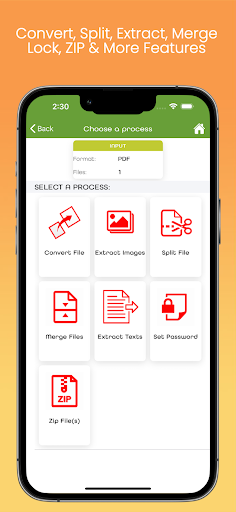
Any file can convert, split, extract, merge, lock and zip.
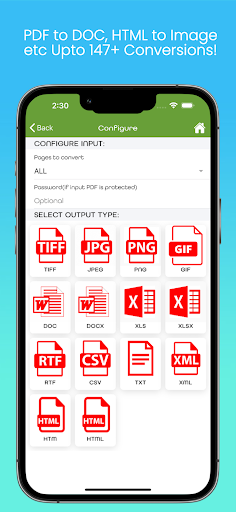
It supports files with format PDF, PNG, TIFF, JPEG, CSV, TXT, XML, RTF, HTML, XLSX and DOCX.
Main Features: - File Converter: Convert a document to another format.
PDF to Doc, XLSX to HTML, PDF to Image etc.
It supports more than 147 types of file conversions.
- Protect file with Password: Lock a file using password.
You can convert a file into PDF format and set a password for that file.
Any PDF file can be converted to a password protected PDF file.
- Extract Images from document: Extract only images from a document.
- Split File: A file can be splitted to different parts.
- Merge Files: Combine different files into one file.
- Extract Text from File: Only text content can be exported from a document.
- Protect PDF file using password: Password can be configured for any pdf file.
- ZIP File: Any file can be compressed and zip documents.
- Resize File: The dimension of image can be changed.BoMo File Converter is developed by an individual developer from India who is developing with the brand name BoMoSi.
https://andro.io/app/fileconverter-18iol
 Power 100


Android app profile
Bomo File Converter & Editor for Android – Latest Version & Features
by BoMoApps
★★★★★
(0 ratings)
Rate this app
How do you feel about Bomo File Converter & Editor?
Thanks for your feedback!
> 2.2k
Monthly Downloads
~$900
Estimated Cost
Screenshots




