
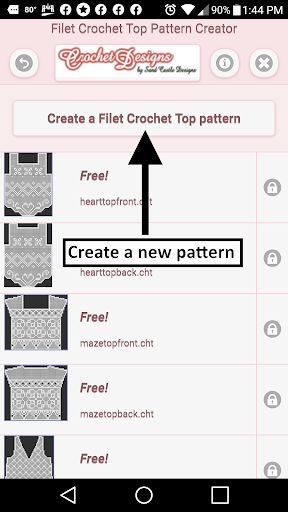
Filet Crochet Top Pattern Creator for your mobile device.Comes with 3 free crochet top patterns.
Download is free.
To activate creation is $2.99.Create Filet Crochet top patterns from filet crochet top templates.
Each template has a front and back top pattern.
Some top patterns also have a sleeve template.
Over 18 top templates to choose from.
To create a filet crochet top pattern, select Create a Filet Crochet top pattern button.
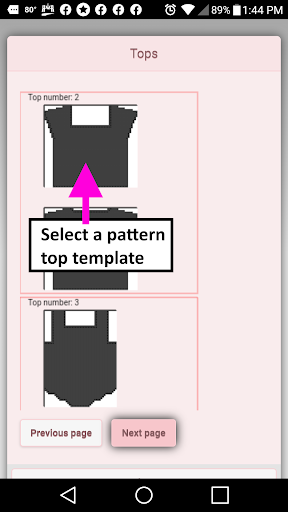
A dialog of top templates will appear.
Select one of the templates to start with.
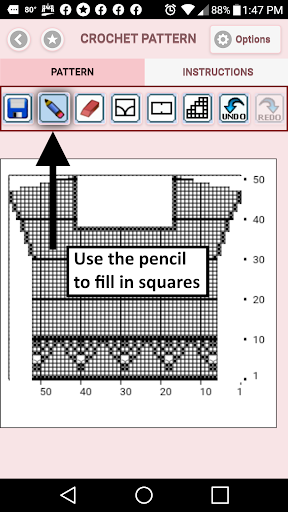
The create filet crochet top pattern editor will appear.
Fill in the squares or select a special stitch to add to your pattern.You can also select from over 200 stamps and inserts to place on your filet crochet top pattern.Save icon - use to save your filet crochet top patternPencil icon - use to (draw) fill-in squares on your filet crochet top patternEraser icon - use to erase squares on your filet crochet top patternFours square stitch icon - use to add the filet crochet stitches displayed on the icon to your patternTwo square stitch icon - use to add the filet crochet stitches displayed on the icon to your patternTrim icon - completely remove squares from your filet crochet top pattern.
Allows you to change the shape of your top pattern.Undo icon - undo each last change you made to the filet crochet top pattern.
Redo icon - redo each changes you undid.Selection icon - select area of pattern to cut or copyCut button - remove all stitches under selected area.
See Selection icon.Copy button - copy all stitches under selected area.
See Selection icon.Paste button - paste the cut or copied stitches.
See Selection icon, Cut icon and Copy iconStamps button - add little stamps (little designs) to add to your top patternInserts button - add pattern inserts to your top pattern (like roses)Zoom in button - zoom in on your top patternZoom out button - zoom out on your top patternShare button - share a picture of your top pattern using email, text etc.
https://andro.io/app/fctopcreator
 Power 100

Android app profile
Filet Crochet Top Creator for Android – Latest Version & Features
★★★★★
(0 ratings)
Rate this app
How do you feel about Filet Crochet Top Creator?
Thanks for your feedback!
> 2.2k
Monthly Downloads
~$900
Estimated Cost
Screenshots




