
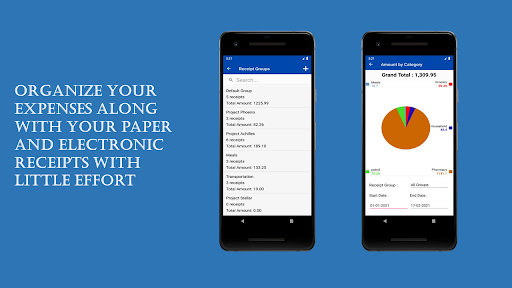
Organize your receipts and expenses with minimal effort.- Take photos of receipts (or snapshot of e-receipts) and automatically organize them as expense receipt entries in a database on your mobile phone.- Flexible management of expense receipt entries, i.e., deletion and edit of expense receipt entries.- Group expense receipt entries according to expense (or receipt) groups you create.
- Flexible management of expense (or receipt) groups, i.e., deletion and edit of expense receipt (or groups).
- Move expense receipt entries between expense (or receipt) groups.- Assign expense category to expense receipt entry.- Use available (default) expense categories or create your own categories.
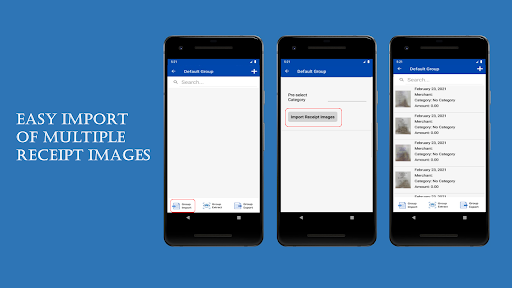
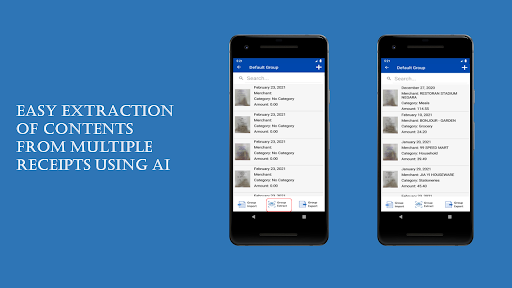
- Flexible management of expense categories, i.e., deletion and edit of expense categories.Generate and view charts of total expenses or by expense groups created.Batch import (Group Import) feature allows import of multiple receipt images in one go.- Take photos of receipts (or snapshot of e-receipts) in advance and import them in one click.Automatically scan and extract relevant contents from receipts using powerful AI driven text extraction engine.
Two ways to run scan and extraction: -- Batch.
Run scan and extraction on selected expense group to scan and extract from multiple receipts under the selected group.- Interactive.
Run scan and extraction on single expense receipt entry and extract from receipt on the selected entry.Multiple export options.- Export expense receipt entries in CSV format (Excel) along with receipt photos in JPG format.
Expense receipt entries in CSV will contain links to corresponding receipt photos.- Export expense receipt entries in CSV format (Excel) along with photos organized, named, and pasted on PDF documents.
Expense receipt entries in CSV will contain names of corresponding receipt photos to allow easy referencing.- Export expense receipt entries in CSV format (Excel) without corresponding receipt photos.
https://andro.io/app/expapp-1548t
 Power 100

Android app profile
EzExpenz: Expense Management for Android – Latest Version & Features
★★★★★
(0 ratings)
Rate this app
How do you feel about EzExpenz: Expense Management?
Thanks for your feedback!
> 2.2k
Monthly Downloads
~$900
Estimated Cost
Screenshots









