
NOTE: - This theme will only apply on LG devices (designed for UX9 but will also work on selected A12 devices)- This theme requires LG SmartWorld to be installed.
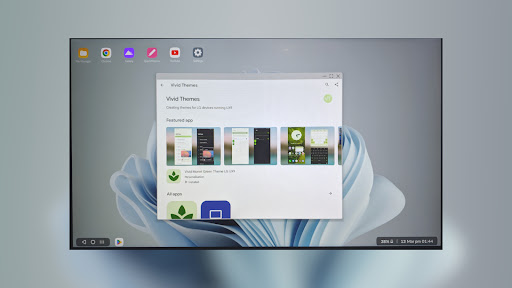
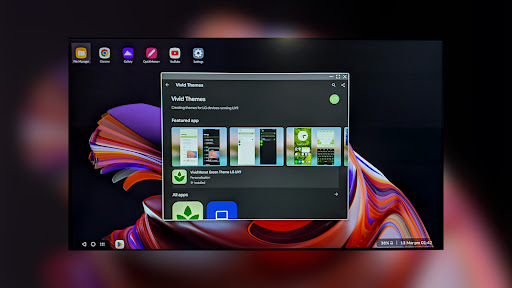
Not likely to work on Verizon devices- This theme must be applied via Settings>Theme>Icon for the wallpaper to be appliedVivid Desktop Wallpaper theme provides a modern feel to Desktop Mode on LG UX9/10 devices by changing the wallpaper to a Windows 11 background as well as modifying the popup window bar color.Desktop wallpaper changes according to Day/Night modeNot only does this theme change the wallpaper to a Windows 11 background, it also changes depending on whether Day/Night mode is active.
This is a feature not provided in the stock Desktop Mode and provides a more comfortable user experience.Window bar color follows Night modeTo complement the changing desktop background, the popup window bar also now follows night mode.
This works best when the app has a night mode and is also a feature not present in the stock Desktop Mode.
In addition, this is also applied to the "Pop-up Window" mode in non-Desktop Mode.Applying the themeThe method of applying the theme is similar to a normal theme:- Navigate to the normal theme menu in Settings.- On the bottom of the screen, tap the icon labelled "Icon".
If this item is absent on your device, install LG Smartworld.- Tap and apply the theme labelled "Vivid Desktop Wallpaper".Applying your own wallpaperSee my developer site for this process, requires a PC.If you encounter any issues with the theme (or have trouble applying it), let me know via the developer contact and I will be happy to help.
https://andro.io/app/desktopwallpaper
 Power 100
Android app profile
Vivid Desktop Wallpaper (LGUX) for Android – Latest Version & Features
by Vivid Themes
★★★★★
(0 ratings)
Rate this app
How do you feel about Vivid Desktop Wallpaper (LGUX)?
Thanks for your feedback!
> 2.2k
Monthly Downloads
~$900
Estimated Cost
Screenshots









