
DAW IT provides 6 useful MIDI utilities:FADERS - 3D PADS - BUTTONS - KEY SWITCHES - AFTERTOUCH - SUSTAIN and HOLDYou can fully control the expression of your software synthesizers by assigning MIDI controllers to any function depending on your soft synths capabilities.Of course, you can do the same for your hardware synths if you connect them to your DAW.Unlike other apps on the market, you can save any group of functions as Presets inside a file which is called Profile.
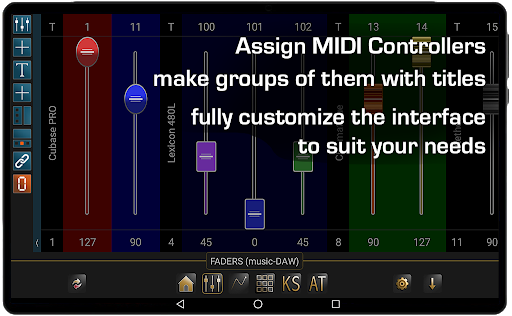
Each Profile can hold multiple Presets, so it’s very easy to group them and recall them later or share them with your friends and partners.Learn more about DAW IT at: www.dawvelopment.com/daw-itMAIN FUNCTIONS1) FADERSAdd up to 40 faders per preset, organize them into groups of your favorite instruments or effects and assign to them their corresponding MIDI controllers.
Name each group with a text label.Customize the look by selecting fader type, fader color, background color, number of rows and more.2) 3D PADSUsually the XY Pads let you control 2 MIDI Controllers with 1 finger on a square surface.
With our app you can use a second finger to control a 3rd MIDI controller, thats why we call this function 3D Pads.Imagine to control Dynamics, Expression and Vibrato Depth of a Cello section, all in real time!3) BUTTONS120 buttons per Preset, each button has two states (MIDI Controller and Program change), that you can swap on the fly one by one or all together.As a result this gives you 240 buttons in total, 120 per panel of the same state or mixed up.This is the right place to setup a Generic MIDI Remote Control for your DAW.4) KEY SWITCHESHave you noticed that many soft synths use the lower or upper octaves as switches for the user to change the sound state?For example you can change your Violins section from Legato to Pizzicato or Spiccato with just a touch.DAW IT provides you with all 10 1/2 octaves to use as Key Switches!5+6) AFTERTOUCH - SUSTAINDo you own a small or cheap MIDI keyboard without Aftertouch or Sustain pedal?Just tap the AT button on DAW IT and enjoy the use of one Aftertouch fader and two buttons, Sustain and Hold.SPECIAL TOOLAUXILIARY PANELEach of the four Main Functions (Faders, 3D Pads, Buttons, Key Switches) can be opened as an Auxiliary Panel which gives the user the opportunity to work with two different functions of DAW IT simultaneously.REQUIREMENTSDAW IT is compatible with Android 6 or later versions of Android.It uses the USB port of your mobile device to send MIDI messages to your DAW.
No extra drivers or hardware needed.For detailed documentation you can read the full Manual: www.dawvelopment.com/daw-it-user-manual-contents
https://andro.io/app/dawit
 Power 100


Android app profile
DAW IT for Android – Latest Version & Features
by Dawvelopment
★★★★★
(0 ratings)
Rate this app
How do you feel about DAW IT?
Thanks for your feedback!
> 2.2k
Monthly Downloads
~$900
Estimated Cost
Screenshots









