https://andro.io/app/dar-16vvd
 Power 100
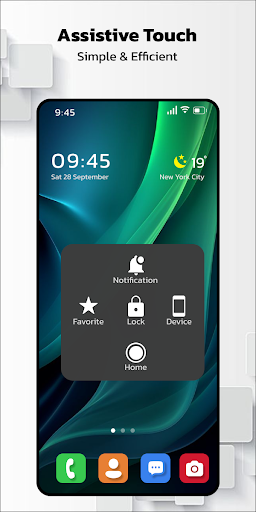
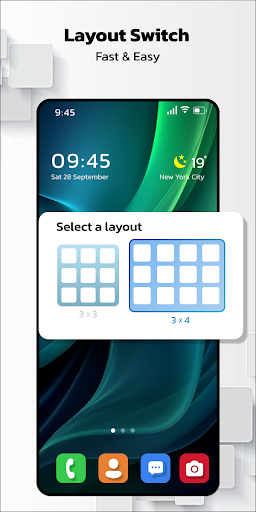
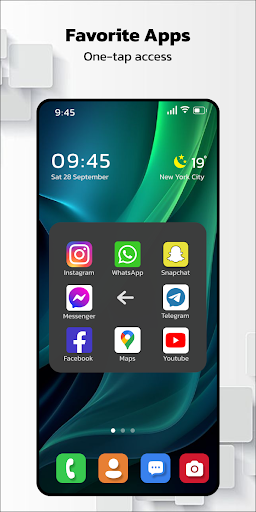

🚀What is Assistive Touch IOS - Screen Recorder?
📱Assistive Touch, born for other OS, now has an Android counterpart!
Its not just fast, its not just smooth – its TOTALLY !
With a floating panel on your screen, navigating your Android smartphone has never been this easy.
🌟 Access your favorite apps, games, settings, and quick toggles in a flash.
Plus, its a savior for those precious physical buttons (home and volume buttons) and a lifesaver for big-screen smartphones.
🌈 **Features of Assistive Touch for Android:**- Virtual Home key: Touch to lock screen and open recent tasks- Virtual Volume key: Quick touch to adjust volume and sound mode- Easy touch for quick access to your favorite applications- Instant access to all settings with just a touch
🚀 **Quick Touch Settings include:**- Capture Screenshot (lollipop)- Screen Recording (lollipop)- Power Popup (lollipop)- Back button- Open Notification- WiFi- Bluetooth- Location (GPS)- Ring mode (Normal, Vibrate, Silent)- Screen rotation- Volume up & down- Airplane mode- Flashlight Bright- All applications on your device
💫 **Screen Recorder:**- The best app for recording Lollipop screens, no root access required!- No time limits, no watermarks, and completely.- Start and stop recording with a single action.- Record your screen in HD and FullHD videos.- Record audio from the mic, perfect for tutorials, promotions, game commentary, or video chats.
✨ **Customize your experience:**- Change the background color to your favorite hue.- Select from a variety of pretty icons for Assistive Touch, all for .- Gesture settings for the floating button (One click, double click, long press).
🌐 **Feedback:**- Love Assistive Touch Easy?
Drop a 5-star review!- Facing issues?
Give us 4 stars, share your problem, and well fix it pronto.- Want a new icon, color, or function?
Shoot us an email – were all ears!
🔐 **Permissions:**- Device Administrator permission for lock screen function.- Accessibility services for various functions (lock screen, home screen, control center, back, screenshot) – no data collection or unauthorized actions!
🙏 **Thanks for your support!
Assistive Touch IOS - Screen Recorder appreciates you!**
🌟
Android app profile
Assistive Touch For Android for Android – Latest Version & Features
★★★★★
(0 ratings)

Rate this app
How do you feel about Assistive Touch For Android?
Thanks for your feedback!
> 2.2k
Monthly Downloads
~$900
Estimated Cost
Screenshots
About Assistive Touch For Android
🚀What is Assistive Touch IOS - Screen Recorder?
📱Assistive Touch, born for other OS, now has an Android counterpart!
Its not just fast, its not just smooth – its TOTALLY !
With a floating panel on your screen, navigating your Android smartphone has never been this easy.
🌟 Access your favorite apps, games, settings, and quick toggles in a flash.
Plus, its a savior for those precious physical buttons (home and volume buttons) and a lifesaver for big-screen smartphones.
🌈 **Features of Assistive Touch for Android:**- Virtual Home key: Touch to lock screen and open recent tasks- Virtual Volume key: Quick touch to adjust volume and sound mode- Easy touch for quick access to your favorite applications- Instant access to all settings with just a touch
🚀 **Quick Touch Settings include:**- Capture Screenshot (lollipop)- Screen Recording (lollipop)- Power Popup (lollipop)- Back button- Open Notification- WiFi- Bluetooth- Location (GPS)- Ring mode (Normal, Vibrate, Silent)- Screen rotation- Volume up & down- Airplane mode- Flashlight Bright- All applications on your device
💫 **Screen Recorder:**- The best app for recording Lollipop screens, no root access required!- No time limits, no watermarks, and completely.- Start and stop recording with a single action.- Record your screen in HD and FullHD videos.- Record audio from the mic, perfect for tutorials, promotions, game commentary, or video chats.
✨ **Customize your experience:**- Change the background color to your favorite hue.- Select from a variety of pretty icons for Assistive Touch, all for .- Gesture settings for the floating button (One click, double click, long press).
🌐 **Feedback:**- Love Assistive Touch Easy?
Drop a 5-star review!- Facing issues?
Give us 4 stars, share your problem, and well fix it pronto.- Want a new icon, color, or function?
Shoot us an email – were all ears!
🔐 **Permissions:**- Device Administrator permission for lock screen function.- Accessibility services for various functions (lock screen, home screen, control center, back, screenshot) – no data collection or unauthorized actions!
🙏 **Thanks for your support!
Assistive Touch IOS - Screen Recorder appreciates you!**
🌟









