
The cSmobile app is the mobile component of the cableScout® fiber management software.
The mobile version was developed for network operators whose employees should benefit from quick access to current network information when working outside in order to be able to guarantee efficient operation and rapid interference suppression of the communication network.cSmobile offers users the great advantage that all important data of the fiber optic network, including the associated map material, can be offline, i.e.
H.
are available on the mobile device without a connection to the server or the Internet.
A connection to the server is only necessary for the import of new or updated data or for the retransmission of red pen corrections.The fiber optic network recorded in the main cableScout® system is transferred to the relevant mobile devices of the approved users via a special admin portal.
The data are displayed identically and in the correct position and contain all important details or overviews of structures, pipes, microtubes, cables, connections, signals, distribution cabinets and components used.A wide range of functions supports the user in his work.
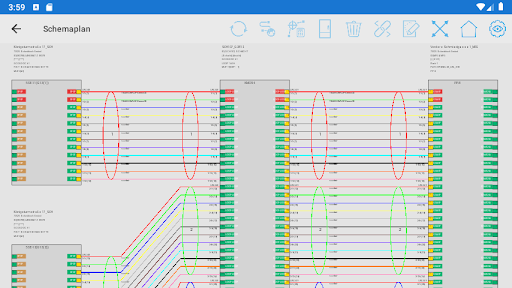
For example, you can search for a signal in the system and display its course in the schematic as well as on the map.
If this signal is disturbed, the user can visualize the possible fault location in the card by entering an OTDR measurement value at the corresponding measurement port.If desired, you can use the navigation function to navigate directly to the relevant position.
With cSmobile, the user can react immediately to malfunctions without having to go to the office beforehand to pick up further information or documents.The so-called red pen function is particularly useful in the field.
This can be used to add comments in the form of text, speech or images to each network object.
If, for example, a discrepancy is discovered in the documentation, this can be recorded accordingly and then corrected in the cableScout® data.The app is very user-friendly and requires neither special cableScout® knowledge nor attending a training course.
The system can therefore be deployed very quickly and can be used company-wide by different user groups to call up information.Some highlights of the mobile version are:- Interface for extraction and compression of network data- Admin portal for managing users and assigning regions- Use of the free SQLite database for server and client -Registration of new devices through QR code is very easy to use- Pipe / route details with occupancy and statistics- Building view with floors, rooms and distributors- Distribution view with components and port status- Cable view in geography and in the schematic plan- Display of signal paths in geography and in the schematic plan- Localization of fault points after OTDR measurement- Creation of red pen corrections (photos, texts, videos, etc.) for objects and positions - Use of high-resolution map material from different sources- Navigation to network objects or to the position of measured cable faults- Various security features such as automatic logoff when not in use, setting the duration of use of data
https://andro.io/app/csmobile-186xp
 Power 100


Android app profile
cableScout for Android – Latest Version & Features
by JO Software Engineering GmbH
★★★★★
(0 ratings)
Rate this app
How do you feel about cableScout?
Thanks for your feedback!
> 2.2k
Monthly Downloads
~$900
Estimated Cost
Screenshots









