
Simpe CheckTable is an app that allows you to easily create checklists in a tabular format, similar to Excel.
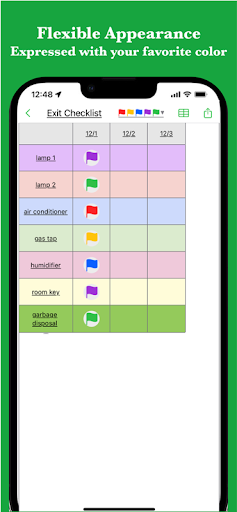
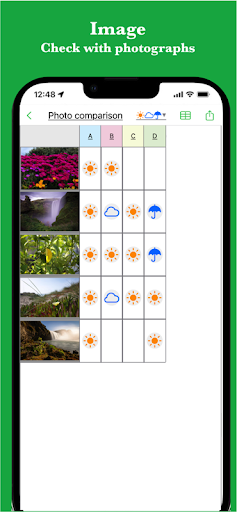
It supports a wide range of expressions, including color, images, and links.It also supports various expressions such as task progress, colors and links.It is used in various situations such as:* Creating comparison tables* Creating task lists* Creating inventory lists* Creating shift schedule tables* Creating itinerary schedule tables* Creating reservation schedule tablesIn addition, there are reports of various ways to use it, as it can be used to manage anything that can be managed with a checklist.
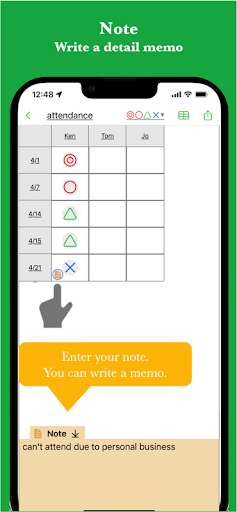
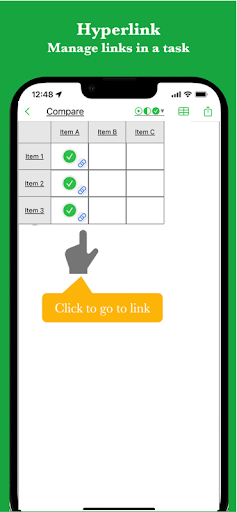
If you need to create a checklist for something small, please give it a try.[Features]- Intuitive operability Ease of use is the most important thing for simple functions.It works quickly and you can edit intuitively.- Diverse check marksIt supports a wide variety of check marks, so you can use your favorite mark.- Rich expression You can express your preferences in a tabular format using colors.- Link You can insert links, making it convenient to insert reference sites for items.- NoteYou can manage the details of your tasks by inserting a descriptive text for each item.- Ready to use You can use it immediately without registering an account.- Export and share You can export the created checklist, share it, or edit it on your PC.- ImportExported checklist data can be imported and edited.- Dark theme support Since it supports a dark theme, it is also ideal for use at night.
https://andro.io/app/checksheet-1r1lz
 Power 100
Android app profile
# Simple CheckTable for Android – Latest Version & Features
by Yuki Tanaike
★★★★★
(0 ratings)
Rate this app
How do you feel about # Simple CheckTable?
Thanks for your feedback!
> 2.2k
Monthly Downloads
~$900
Estimated Cost
Screenshots









