
If a phone no longer charges to 100%, then the battery is not always to blame.
In most cases you are using a defect cable or charger.
Not every cable is suitable for charging and not every charger keeps what he promises.
Test the cables and chargers to find the best combination.
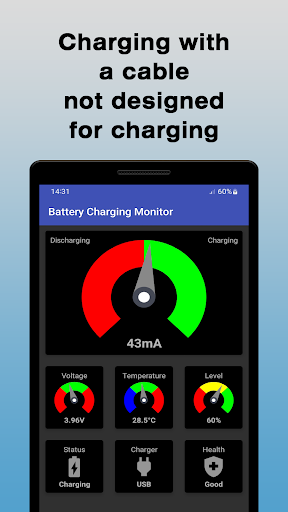
This app will help you.The app shows the charging current in milliamperes.
A negative value means the battery is discharging and a positive value means the battery is charging.
There is no specific rule for the charging current.
However, some sources say that the charging current should be around 10% of the battery capacities in mAh.
This means that a battery with 3000 mAh should be charged at about 300 mA.NotePlease note that the charging current may not be displayed on all devices as some manufacturers have decided to prevent this.VoltageThe voltage should not fall below a certain value.
Otherwise the device will not work properly.
If the voltage is too high, the device can be damaged.TemperatureIf the temperature is too low the battery might not provide the necessary power.
A high temperature might have a negative effect on the batterys lifetime.LevelThe level is an indication of the batterys state of charge.StatusThe status can have one of the following states:• Charging• Full• Discharging• Not charging (in case of a problem)ChargerSpecifies the type of the charger which can be:• USB (connected to a computer)• AC (common cable charger)• Dock (docking station)• Wireless (wireless charger)HealthThis information comes from the device and actually hasnt so much to do with the health status of the battery.
It can have one of the following states:• Cold (battery is too cold)• Dead (battery doesnt charge anymore)• Good (Non of the other states)• Overheat (battery is too hot)• Over voltage (battery has over voltage)• Failure (there is a problem with the battery)Update intervalThe update interval depends on the device.
Anything between 1 second and 60 seconds is possible.
The app shows changes immediately, however, cannot affect the interval.
https://andro.io/app/chargingmonitor-1fuqp



Rate this app
How do you feel about Battery Charging Monitor?
Thanks for your feedback!
> 2.2k
Monthly Downloads
~$900
Estimated Cost
Screenshots









