
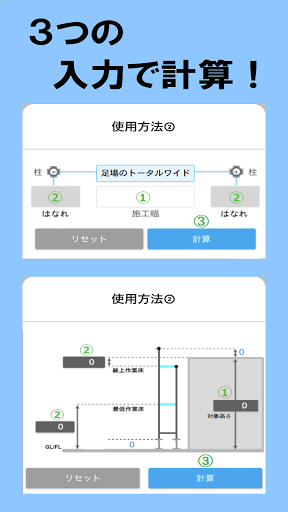
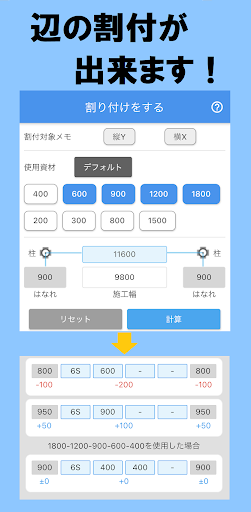
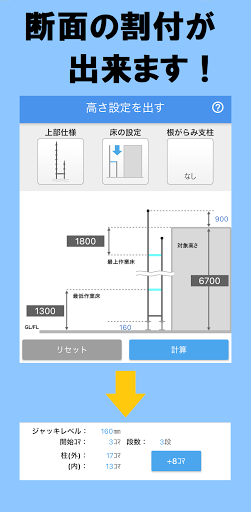
You can see the calculation result of the plane allocation of "side" just by entering the number.You can see the calculation result of the height cross-section allocation just by entering the number.-Calculation time is shortened.・ Calculation mistakes are reduced.・ Oversight of choices is reduced.・ Because you can see it on the spot, it goes well with the site.(Just enter the numbers measured on site)[Plane allocation]・ You can see the options for allocation.・ You can see the total wide of the scaffolding.・ You can see an increase or decrease from the ideal distance.・ You can select materials.how to use(1) Construction width input → (2) Separation input → (3) Press the calculation button.[Height allocation]・ You can see the jack level.・ You can see the start frame.・ You can see the total number of stages.・ You can see the number of frames used for the outer and inner pillars.・ The total number of frames is divided by 8 frames.-You can select the top specifications.-You can also select the root pillar (2 frames).how to use① Target height input → ② Height input of either the top anti or the first stage → ③ Press the calculation button.Since the calculation history does not remain in the app, please respond with notes and screenshots.
https://andro.io/app/calculator-1cq0r
 Power 100

Android app profile
足場計算機 for Android – Latest Version & Features
★★★★★
(0 ratings)
Rate this app
How do you feel about 足場計算機?
Thanks for your feedback!
> 2.2k
Monthly Downloads
~$900
Estimated Cost
Screenshots









