
Bleam tools app is designed for set up and management of Bleam service locations.
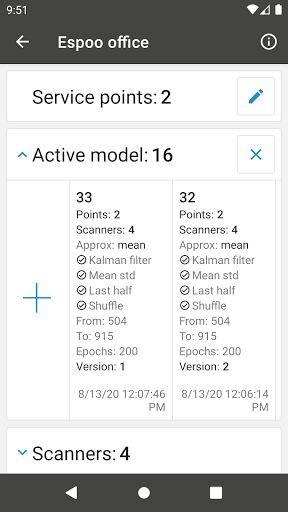
Every unique service location has service points, data processing model and Bleam Scanner settings.
All these settings are managed via Bleam tools app.Bleam technology allows service locations eg.
shops, gas stations, gyms etc.
to automatically authenticate their users and provide them automatic, frictionless service.
To make it possible Bleam uses a combination of geofencing and BLE technologies.List of settings that can be managed with Bleam tools app:• Number of service points - active location spots for user authentication;• Processing type: • Dummy - based on RSSI levels received from one Bleam Scanner that is installed nearby the active location spot; • Model - based on RSSI levels from multiple Bleam Scanners installed in unique location, previously trained as an AI model.• Phone RSSI settings (iPhone, Android and others)• Bleam Scanner information and settings: • Number of scanners; • Bleam Scanner actions: • Replace; • Reboot • Upgrade; • Unconfig; • Send to sleep; • Set minimal RSSI.
https://andro.io/app/bleneurowrite
 Power 100


Android app profile
Bleam Tools for Android – Latest Version & Features
by CONNAX
★★★★★
(0 ratings)
Rate this app
How do you feel about Bleam Tools?
Thanks for your feedback!
> 2.2k
Monthly Downloads
~$900
Estimated Cost
Screenshots









