
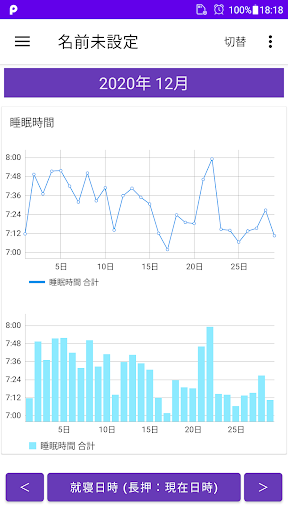
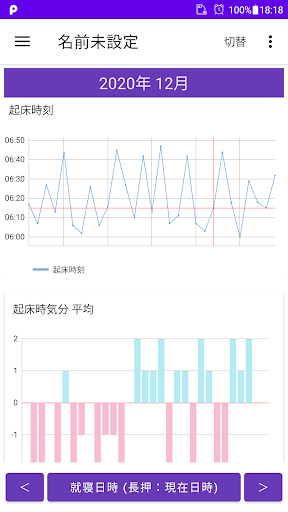
Sleep time is calculated from the entered bedtime and wake-up time, and the sleep time is displayed as a line graph and bar graph.Sleep time can be grasped with line graphs and bar graphs.▼When recording bedtime1.
Tap the "Bed time" button.If you press and hold for a long time, step 2 / step 3 will be skippedThe current date and time will be set.2.
Select the date and tap "Next".3.
Enter your bedtime and tap OK.▼ To record the wake-up date and time1.
Please tap the "Wake up date" button in the field of wake up date in the table.If you press and hold for a long time, step 2 / step 3 will be skippedThe current date and time will be set.2.
Select the date and tap "Next".3.
Enter the wake-up time and tap "Done".▼ To record the waking date and time immediatelyIf you long-tap/long-press the "wake up date" character in the wake up date field of the table, the date and time at that time can be recorded as the wake up date.▼ Sleep timeThe sleeping hours in the table are automatically calculated and displayed from the date and time of bedtime and the date and time of waking up.▼ To record your mood when you wake up1.
Tap the "Wake up mood" button in the "Wake up mood" column.2.
Select the mood when you wake up.▼ To delete one record"Long press/long tap" the record you want to delete from the tableYou can display the deletion screen.▼ To delete all recordsDelete all data from the menu on the upper rightYou can delete all records.▼Hand over model change dataTap "Transfer model data" in the menu to display the following selection screen.・File creation (create backup file for model change)・Restore (Restore data from backup file)Step A.
Steps to create backup file1.
Tap "Transfer model data" in the menu.2.
Tap Create file.3.
Tap "Create file" on the confirmation screen.4.
Tap "Select app" on the send screen.5.
Tap “Save to drive”.Step B.
Restore (Restore data from backup file in Step A)1.
Start Google Drive on the new smartphone/tablet, select the backup file, and tap "Download" from the menu.2.
Install this app from google play on your new smartphone/tablet.
Launch the app.3.
Tap "Transfer model change data" in the menu.4.
Tap Restore.5.
Tap the file to restore from the list of files to restore.
https://andro.io/app/bedtime-1d0i0
 Power 100


Android app profile
就寝時間 起床時間 記録帳 睡眠のグラフを表示するアプリ for Android – Latest Version & Features
★★★★★
(0 ratings)
Rate this app
How do you feel about 就寝時間 起床時間 記録帳 睡眠のグラフを表示するアプリ?
Thanks for your feedback!
> 2.2k
Monthly Downloads
~$900
Estimated Cost
Screenshots









