
Kim, Jung - Hyun Hi-axis converter is created.[App Thank you for help janghoyeon whos responsible, singangsiks responsibility, edgeds responsibility, jeonghaein Institutes help before the birth.
]1.
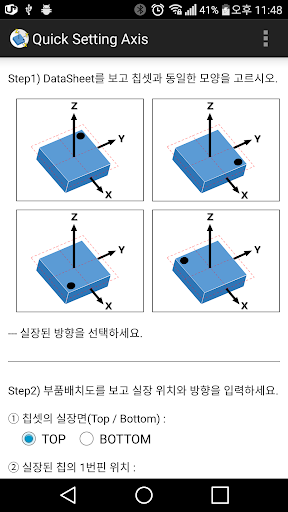
Select the chip information in the Data Sheet provided by the sensor manufacturer.2.
Select a room scene (Top / Bottom) Mounting orientation and arrangement of parts.3.
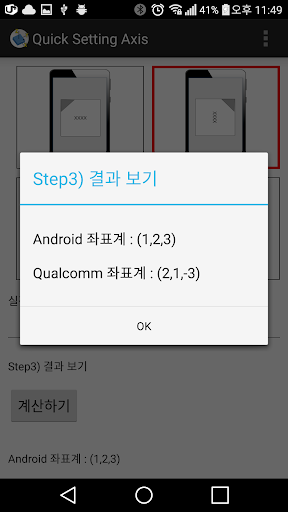
calculation, using the calculate button.(NOTE) Calculate Algorithm-------------------------------------------------- --------------------void Calculate_Axise (){/ ************************************************Step.************************************************ /Rotation = PlacementPoint - StandardPoint;if (Rotation == 0) {// 0 degree rotationPlace_X = Chipset_X;Place_Y = Chipset_Y;Place_Z = Chipset_Z;} Else if (Rotation == 1 || Rotation == (-3)) {// Rotate 90 degreesPlace_X = Chipset_Y;Place_Y Chipset_X * = (-1);Place_Z = Chipset_Z;} Else if (Rotation == -1 || Rotation == 3) {// -90 Degrees rotationPlace_X Chipset_Y * = (-1);Place_Y = Chipset_X;Place_Z = Chipset_Z;} Else {// 180 degreesPlace_X Chipset_X * = (-1);Place_Y Chipset_Y * = (-1);Place_Z = Chipset_Z;}/ ************************************************Step.************************************************ /if (PlacementFace == 1) {// TOP PlacedPlace_X = Place_X;Place_Y = Place_Y;Place_Z = Place_Z;} Else {// BOTTOM PlacedPlace_X Place_X * = (-1);Place_Y = Place_Y;Place_Z Place_Z * = (-1);}/ ************************************************Step.************************************************ /QCT_X = Place_Y;QCT_Y = Place_X;QCT_Z Place_Z * = (-1);}-------------------------------------------------- --------------------Thank you.
https://andro.io/app/axisesetting
 Power 100


Android app profile
축계산기 for Android – Latest Version & Features
by gadians2001
★★★★★
(0 ratings)
Rate this app
How do you feel about 축계산기?
Thanks for your feedback!
> 2.2k
Monthly Downloads
~$900
Estimated Cost
Screenshots









