
This is the aXes-Mobile client component.
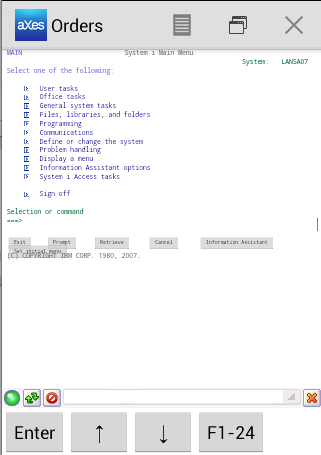
You need to install the aXes Server component on your IBM i server.”aXes Mobile provides mobilization and modernization capabilities for the enhancing the display of IBM i 5250 screens on mobile devices.
aXes Mobile is an extension of the aXes product family (http://www.axeslive.com/) which allows 5250-applications running on IBM i (AS/400) servers to be instantly displayed via web browsers, with the option of extending and modernizing them.
The mobile applications can be created and maintained by existing IT staff with IBM i skills.
aXes-Mobile enables: - Multiple 5250-sessions to the same IBM i server: For example instantly swap and share data between Ordering, Customer Maintenance and Invoicing screens without navigating 5250 menus.
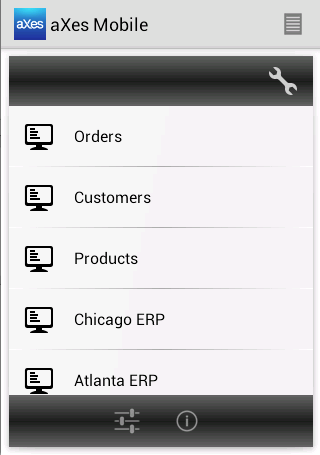
- Multiple 5250-sessions to different IBM i servers: For instance instantly swap between CRM and ERP on different IBM i servers.
Again, data can be shared between sessions.
- Single signon to multiple 5250 sessions.
- Enhanced function key and Enter key handling.
Remember that mobile devices do not have function keys like 5250 devices or PCs do.
- Integration with other corporate web pages - Running of queries over you IBM is DB2/400 database - Automated configuration from URLs received via QR code, SMS or email.
- Viewing and printing IBM i spool files.
- Wireless printing directly from device.
A server-side program can print to a wireless printer directly or with a preview.
For example a 5250 RPG program can print an invoice or a receipt.
- Photo and video capture and annotation.
Images and videos can be captured replacing text, for example in issue or damage reporting, asset management, HR, OH&S, site or product inspections.
Users can annotate images to increase understanding.
- Camera Based Bar Code Scanning to speed up access to information.
- Email, SMS, Phone and Voice integration with existing 5250 applications.
- Copy to Clipboard and ‘Intelligently’ format and post data to the mobile device user’s clipboard.
For example formatted product details on a 5250-screen can be posted as a response to a customer’s email inquiry.
- PDF integration.
Produce, display, print and locally save PDF documents.
- Read and write data to the mobile device’s local file system.
For example upload the daily schedule for a sales rep as a PDF for later offline access.
- Upload local files to the IBM i’s IFS.
- Download files from the IBM i’s IFS.
5250 iseries as400 lansa
https://andro.io/app/axes-ng2y
 Power 100


Android app profile
aXes Mobile for Android – Latest Version & Features
★★★★★
(0 ratings)
Rate this app
How do you feel about aXes Mobile?
Thanks for your feedback!
> 2.2k
Monthly Downloads
~$900
Estimated Cost
Screenshots









