
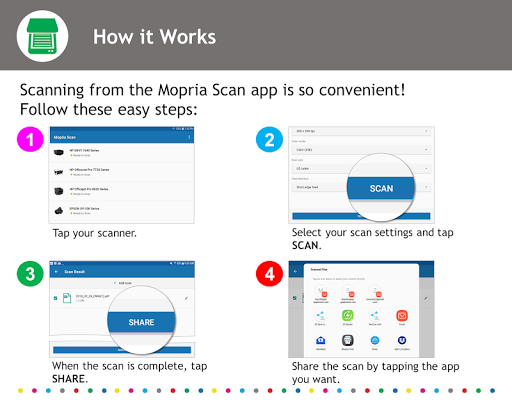
The Mopria Scan application automatically connects your Android phone or tablet to scanners and multi-function printers (MFPs) on the same Wi-Fi network.
Once connected, you can use the Mopria Scan application to control your scan settings, initiate your scan, organize, and rename your digital scan and share the scanned data with other people and applications.
To check if your scanner or multi-function printer is Mopria® certified before installing Mopria Scan, go to http://mopria.org/certified-products.Advanced features of the Mopria Scan applications include:- Initiate scan from the Mopria Scan application- Initiate scan from other applications: email, file browsers, etc.*- Select scan resolution- Select color or B/W- Select scan format: JPG or PDF (other formats scanner dependent)- Select input type: photos, documents, etc.- Discover scanners automatically over Wi-Fi- Add scanners manually using IP address- Select scan area- Edit scan file name- Save scans on the phone or tablet- Share scans to other applications: email, file browsers, etc.*- Share scans to cloud services: Dropbox, Evernote, Google Drive, etc.*- Print scans**requires additional applications also be installed on the Android deviceThe Mopria Alliance has been the leader in defining and implementing specifications around mobile print.
Now, we are expanding our expertise to also include scan.
To learn more about the Mopria Alliance, what we have been working on, and where we are headed, please visit www.mopria.org.
Print.
Scan.
Go.
https://andro.io/app/application-rskk
 Power 100


Android app profile
Mopria Scan for Android – Latest Version & Features
★★★★★
(0 ratings)
Rate this app
How do you feel about Mopria Scan?
Thanks for your feedback!
> 2.2k
Monthly Downloads
~$900
Estimated Cost
Screenshots









