

The Open Weather Station (OWS) is a do-it-yourself weather station solution that aims to be affordable, stable, easy to build and tested in the wild.
It evolved from other approaches I have been testing and using in the field since late 2012 to this day.
Check out the full project details and how to build your own in the following url: openweatherstation.comIMPORTANT!
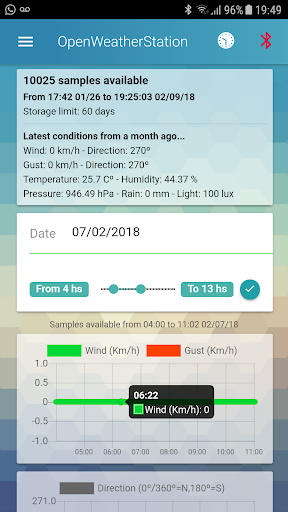
The app is exclusively designed to connect to the arduino module built following the openweatherstation.com instructions.Some of the main OpenWeatherStation App features are: * connect to the OWS module, view and store data, * store samples up to 60 days, * visualize graphs in real time, * access historical data by date and time intervals, * configure up to 2 servers to upload weather data, * setup all common API custom settings or use a preconfigured server * preconfigured servers available for WindGuru, Wunderground, Thingspeak and OpenWeatherMap * export stored data to local file (json) * send exported data file via email * auto switch from wifi to cellular data if wifi has no internetOnce you download the app the first thing is to pair it to the OWS bluetooth.
* Go to "OWS Module" on the left menu* If you havent paired the bluetooth click on the top right icon to open bluetooth settings and pair the device* Once paired, go back to the app, and refresh the devices list.* From the list of devices choose the one you want to connect to and set it as the OWS device.* You can inspect the packages received from the OWS module by opening the data monitor* When sending the data to a remote service you can turn on "Prevent LieFi" (you need to enable both WiFi and cellular data)* In the situation that the WiFi connection is working but has no internet Android will not auto switch to cellular data, under this scenario if you have enabled "Prevent LieFi" the app will turn off WiFi and use cellular data packets until WiFi Internet is back, and the app will turn on Wifi again...
yes, I know...
you are welcome :P*All the other settings are pretty much self explanatory.If you are using the android device for telemetry you may want to root your device and also install the Remote Reboot app (https://play.google.com/store/apps/details?id=ar.com.axones.remotereboot).
This app will act as a watchdog allowing you to reboot Android remotely via SMS or using a URL endpoint so everything can start fresh again.
https://andro.io/app/app-z93v


Rate this app
How do you feel about Open Weather Station?
Thanks for your feedback!
> 2.2k
Monthly Downloads
~$900
Estimated Cost
Screenshots









