
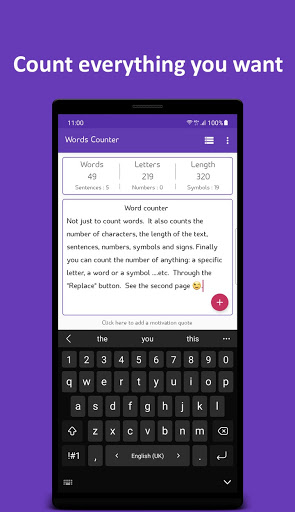
An application that counts the number of anything in a specific text.
It calculates the number of words - letters - the length of the text - sentences - numbers - symbols and signs.
Finally, you can define one thing and count it easily, whether it is a word, a letter or a sentence ...
etc.App useful for:• Students: whether you are a university student or school student.
The "word counter" application will help’s you a lot in solving your homework or university research.• Writers/Authors: Whether you are a writer of stories and novels or a writer of media reports.
Our application will help you determine how many words or the length of the message you have written.• Content creators: Some social media sites have pre-set text length.
And you have a long message you would like to post.
Instead of writing a new message and publishing it every time.
Through the application, you can write the message or the entire content and then divide it into several parts of the length you need.
Click on the part you want to publish to copy it.Hidden functions in the floating button:• Text reading: Quickly read the text.
Also learn to read English language.• Spelling of letters: to learn letters and the language.* Note: To use these two features, please make sure to download the language dictionary by searching for "text-to-speech" in the device settings, and make sure to change the applications language to the language you want to read from the application settings.• Convert image to text: With this feature, you can upload or visualize an image and convert the written text in it into editable text.* (This feature supports the English alphabets only).• Text splitting: you can write the entire text and divide it into small parts.• Replace: replace a word, a letter, or ...
etc.
With something else.• Count a specific thing: Easily count the number of anything in the text.
a word, a letter, or ...
etc.• Save text inside the application: Save the text in a safe environment.
Where any other application cannot access the data.• Save the text as a pdf document: You can share the text with another person by converting the text to pdf.• In addition to the help buttons for pasting, copying and deleting.Application features:• Light in the device.Permissions are not required except in the case of uploading an image or save as a pdf.• Ease to use.• Saves time and effort.• Supports dark colors.• It contains only one advertisement per page and disappears when you start writing.• Count words - letters - the length of the text from outside without opening the app.
Without losing the original text.
By sharing the text with "Words counter" app.
https://andro.io/app/app-1nubm
 Power 100


Android app profile
Words Counter for Android – Latest Version & Features
★★★★★
(0 ratings)
Rate this app
How do you feel about Words Counter?
Thanks for your feedback!
> 2.2k
Monthly Downloads
~$900
Estimated Cost
Screenshots









