
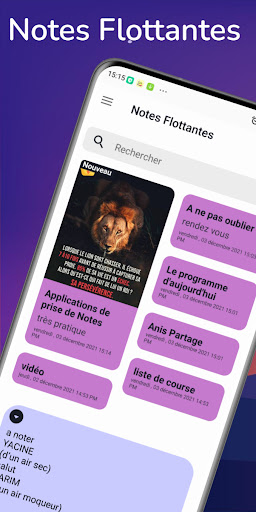
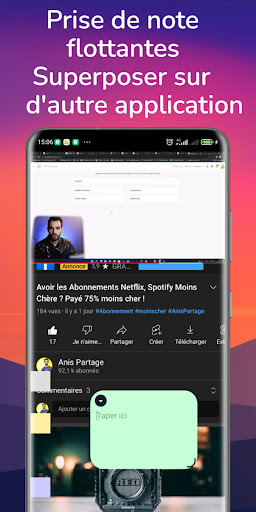
Floating Note Taking for better memorization of superimposed notes.Floating Notes is a simple notepad application.
When writing notes, memos, emails, messages, shopping lists, and to-do lists, it provides you with a quick and easy notepad.
The Floating Notes benefit allows you to take notes while using other calling or messaging applications (YouTube, Facebook) or PDF documents at the same time.
And Floating Notes is easier to take notes than other notepad and memo apps.* Options- Floating notes- Notes overlay- Organize notes by their color- Paste the widget in their category- The checklist for making the list and making the shopping list- Organize your program in the calendar- Password protect your notes- Protected backup on SD card- Reminder on the status bar- List / Grid View- Look for notes- Notepad Helpers- Quick memorandum / notes- Sharing notes via SMS, email, twitter- Use color to categorize notes.- add images in your notesCreate NotesTap the + icon at the bottom of the Floating Notes overlay home screen to create a note.Lock Note1.
Click the More options button on the main interface of Floating Notes overlay, select Settings,Then select Lock Note to create a password.2.
Create a password, and then tap the note you want to lock.3.
Press the More options button while viewing the note, and then select Lock.Add textTap the keyboard icon at the top of the screen to enter text using the keyboard.Use the rich text toolbar to change the style of the text.Add handwritingTap the handwriting icon at the top of the screen to add handwriting.Can recognize handwritten text.
You can also use handwriting to search for keywords in your notes.Adding images Touch more option and the image icon at the top of the screen to insert images.
https://andro.io/app/app-1li0e
 Power 100


Android app profile
Notes Flottantes overlay for Android – Latest Version & Features
by Anis Partage
★★★★★
(0 ratings)
Rate this app
How do you feel about Notes Flottantes overlay?
Thanks for your feedback!
> 2.2k
Monthly Downloads
~$900
Estimated Cost
Screenshots









