
BatApps hides other apps on your phone using the "Device Administrator" permission and a secret calculator PIN screen.
It creates a secondary profile to help protect your private information by controlling when to hide or reveal the apps installed on that profile.
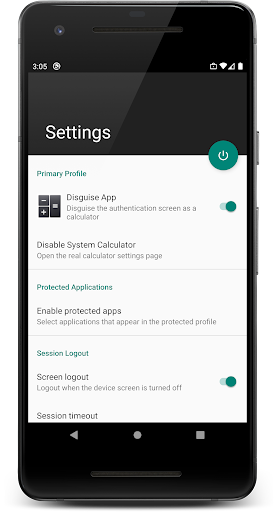
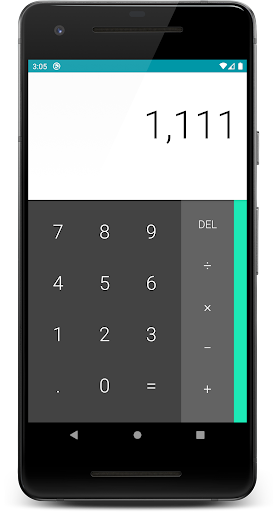
You can configure the BatApps PIN screen to disguise itself as a calculator and reveal your apps only when your second profiles PIN is entered into the calculator.
It can also be configured to automatically hide your apps after a set time or even every time your phones screen is turned off.With BatApps you can have completely separate contacts, call log history, photos, or any other application youd like to keep private.
It is a secure vault for all your data, apps, and file.
Unlike other solutions, your second profile will have a separate Play Store enabled, so any app you download from it will only be available when your second profile is activated.
Install a burner phone app with a different phone number, messaging app, or even an Uber or Lyft app and keep you destination history hidden from anyone snooping on your phone.
Most importantly, BatApps does not require an identity such as an email or phone number to use it and it does not collect or send any data from your device to our servers.
The ONLY exception to this rule is to validate in-app purchases but this is done anonymously through the Google Play Store.*** Important Uninstall Instructions ***Because BatApps creates a second user profile on your device, uninstalling it requires an additional step.
You must first delete the profile it created, you can do so by tapping the Remove Protected Profile option listed in the Uninstall section of the BatApps Settings screen.
Refer to the last screenshot of this Store listing or the video link below for details.
To uninstall BatApps from your primary profile you do so as you would any other app.Uninstall Details Video: https://youtu.be/KCzVBvA3G9Q
https://andro.io/app/android-otot
 Power 100


Android app profile
BatApps: Hide and Lock Apps for Android – Latest Version & Features
by Be Anonymous Technologies, Inc
★★★★★
(0 ratings)
Rate this app
How do you feel about BatApps: Hide and Lock Apps?
Thanks for your feedback!
> 2.2k
Monthly Downloads
~$900
Estimated Cost
Screenshots









