
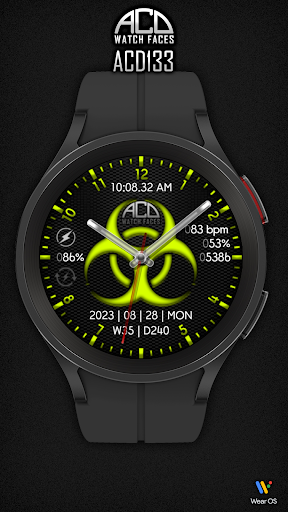
Design inspired by the biohazard signs.
You can change between 18 colors and dark or light mode for the bezel and biohazard sign.Features:1.
Analog watch hands2.
Digital time in 12 or 24-hour mode3.
The watch battery indicator changes to yellow under 20% and to red under 5%4.
The watch battery percentage5.
The watch battery charge indicator that lights blue when charging the watch6.
[Year][Month][Day][Week day] (multilingual)7.
[Week of the year][Day of the year]8.
Last heart rate measurements.9.
Steps goal percentage.
The daily goal is set to 10000 steps.10.
Steps count11.
18 colors that can be changed from the customize menu on the watch or the mobile app12.
You can set the bezel to dark or light mode from the customize menu on the watch or the mobile app13.
You can set the biohazard logo to dark or light mode from the customize menu on the watch or the mobile app14.
Optimized for always-on display modeSite: https://www.acdwatchfaces.comFacebook: https://www.facebook.com/acdwatchfacesInstagram: https://www.instagram.com/acdwatchfacesYouTube: https://www.youtube.com/@acdwatchfaces
https://andro.io/app/acd133


Android app profile
ACD133 Biohazard for Android – Latest Version & Features
Power 100
Rate this app
How do you feel about ACD133 Biohazard?
Thanks for your feedback!
> 2.2k
Monthly Downloads
~$900
Estimated Cost
Screenshots




