
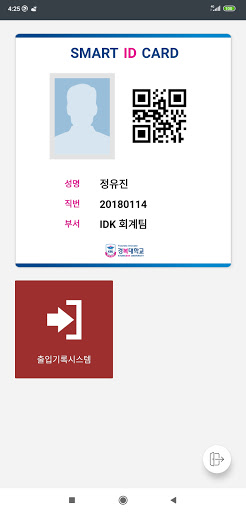
Gyeongbok University SMART ID for faculty and visitors app is a mobile app that serves the Kyungbok University faculty and visitors.With the campus identification card, electronic attendance, access/body temperature record app, you can use the QR code on campus to access buildings, electronic records, and attendance checks.
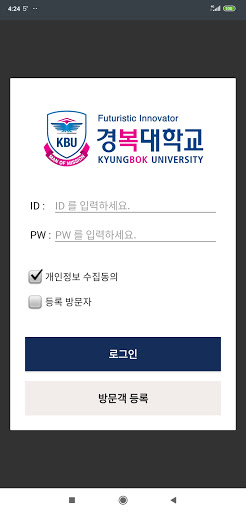
■ How to log in -Faculty If you log in with your Kyungbok University portal account (ID, PW), it is issued immediately and can be used.-Regular external visitors If you log in with the account (ID, PW) issued through the Kyungbok University access record system administrator, it is issued immediately and can be used.
(Can only be used within the expiration date set by the administrator)-External visitors Only access/body temperature recording is possible, and when checking an external visitor on the app login screen, you will be taken to the personal information entry and survey screen.
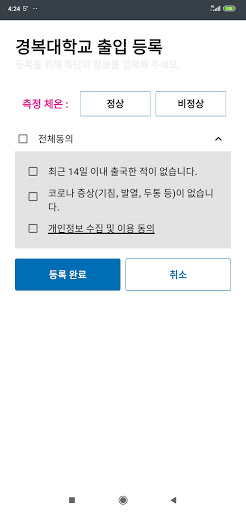
■ How to use -Access by building You can enter by recognizing your QR code on the access control terminal on the initial smart ID screen.-Access/body temperature record On the initial screen, selectAccess Record System, fill out the questionnaire, send it, and scan the QR code for each building to use.
■ Notes -You must sign up for a Kyungbok University portal account to use it.
https://andro.io/app/access-record-kbu
 Power 100
Android app profile
경복대학교 SMART ID 교직원 및 방문자용 for Android – Latest Version & Features
by Sitin Corp.
★★★★★
(0 ratings)
Rate this app
How do you feel about 경복대학교 SMART ID 교직원 및 방문자용?
Thanks for your feedback!
> 2.2k
Monthly Downloads
~$900
Estimated Cost
Screenshots









