
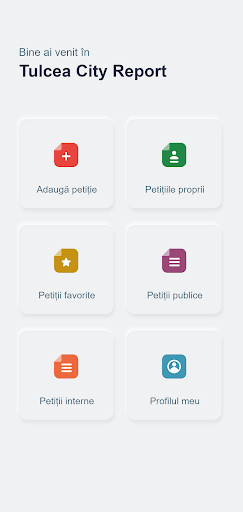
Tulcea City Report is a free, simple and intuitive application for mobile phone or tablet, which allows citizens with a civic spirit to send various notifications and incidents to Tulcea City Hall.
Occasional problems on city streets, such as asphalt pits, community dogs, household waste or debris thrown at random, garbage in the means of transport, malfunctions in public lighting, vandalized garbage cans, abandoned vehicles, snow jams, water damage cold and hot, clogged sewers, etc., can be transmitted directly from the mobile device to the dispatchers of public service operators, in order to act promptly and limit any damage.When installing the application, the mobile phone must have an active internet connection, but to send a notification, the application can work even in the absence of this connection, the notification will be transmitted when the mobile device is connected to the internet.The application is a hotline for public issues, which will help develop the civic spirit of citizens and increase confidence in local public service operators.How do I file a complaint?1.
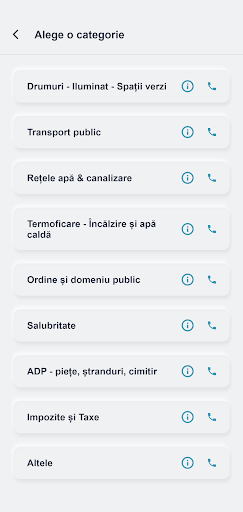
Choose the category of problem reported.2.
Take a picture that shows the problem as clearly as possible or upload the picture taken before (notifications can be sent without pictures).3.
Briefly describe the problem (eg collapsed manhole).4.
Fill in the street and the number where you reported the problem or press the blue square button next to the address box to locate the problem on the map - the address will be filled in automatically (pressing the blue button will give the authorities the exact GPS location of the problem).5.
If you have already filled in the identification data in the "My profile" section, they will be automatically retrieved in the notification.
Otherwise, in order to send the notification you must fill in the identification data (name, surname, telephone number).6.
Send notification - top right button ("check").Petition statuses:Status "Registered" - at this moment the notification is sent to the competent department.Status "In progress" - at this moment the notification has been taken over by the competent department and the next step in resolving the petition will be communicated to you (eg: The team will check).
, in which case the user is notified.Status "Resolved" - at this time your complaint has been resolved or has a final response that will be communicated to the user.Status "Rejected" - the notification has inappropriate content or does not fall within the type of notifications that are the subject of this communication channel.
The rejection message will be accompanied by an explanation.
https://andro.io/app/tulcea
 Power 100


Android app profile
Tulcea City Report for Android – Latest Version & Features
★★★★★
(0 ratings)
Rate this app
How do you feel about Tulcea City Report?
Thanks for your feedback!
> 2.2k
Monthly Downloads
~$900
Estimated Cost
Screenshots









