
A little inconvenience of life - we recommend this new function of daily calculator for those that are dealing with inconvenience of calculation with writing down new formula everytime when you recalculate.
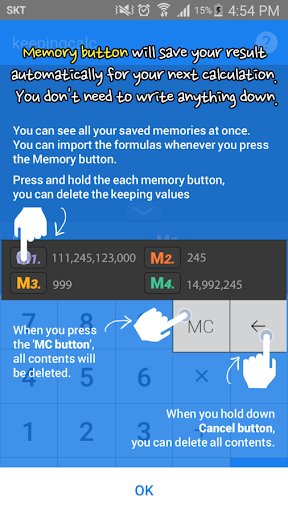
■ You don’t need to write down previous result for your next calculation!■ You can see the saved formulas at once!Please save the results in 4 different memory buttons: M1,M2,M3,M4.You can bring the preserved values while your calculation whenever you need.▶ Method of Use- Enter the numbers or If you want to save the results, press the memory button when you have a calculation.- You can see saved calculations at once from the screen.- Press the memory button when you want to bring the preserved values.- When you hold down the unwanted memory button, the memory will be deleted.- Press MC Button and all saved contents will be discarded.- You can check the history of formulas at Calculated statement and import the histories for your next calculation.
https://andro.io/app/memorycalc
 Power 100


Android app profile
keepingcalc brandnew for Android – Latest Version & Features
by (주)넥스모어시스템즈
★★★★★
(0 ratings)
Rate this app
How do you feel about keepingcalc brandnew?
Thanks for your feedback!
> 2.2k
Monthly Downloads
~$900
Estimated Cost
Screenshots









