
App for testing whether your phone support recording high frame rate video using the camera2 package from the Android SDK.
If the app works, you will be able to record video only high frame rate (>= 120 frames per second) video only (i.e., no audio) recordings on your smartphone camera.Note that the app is experimental and requires restarting after granting permissions for camera and writing onto the device storage or media access in newer Android versions.
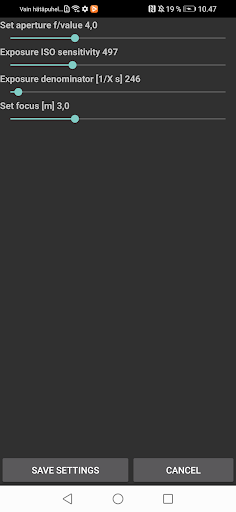
I was unable to figure out the various alternative app life cycles and you may need to completely close the app e.g., by accessing the Android view where you can scroll through the recent apps and flicking this app off the screen.You will need to set focus, aperture, light sensitivity, and exposure time manually through the settings to suit the present conditions.
Automated focus and exposure slow down the capture frame rate and, hence, I went for manual settings.
The video recordings will be stored in the Movies folder.
https://andro.io/app/fps-cam
 Power 100


Android app profile
High FPS Camera test app for Android – Latest Version & Features
★★★★★
(0 ratings)
Rate this app
How do you feel about High FPS Camera test app?
Thanks for your feedback!
> 2.2k
Monthly Downloads
~$900
Estimated Cost
Screenshots









