

Encrypt/Encode your message to hide contentsSimple and straight forward.
No Ads and easy-to-use interface.Online Manual: https://p-library.com/a/encoda/Sample Usage: You write your diary, or gonna send messages or a password to someone, but you dont want them to be found by other people?
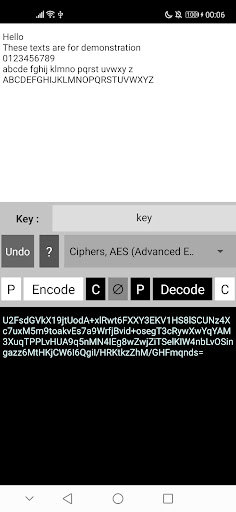
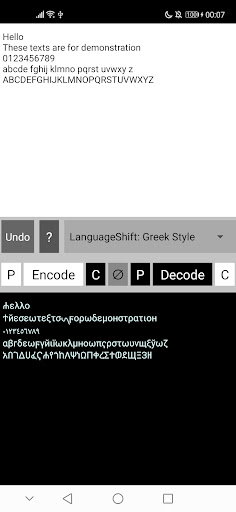
With this tool, you can hide the contents.====================Encryption/Encoding Methods[Key-based] a key is required- Ciphers, AES (Advanced Encryption Standard) : Specify a “key” for encrypt and decrypt messages- AlphabetShift: Caesar Cipher : Shift English alphabets by a given amount (“code”)[LanguageShift] hide contents in the form of non-English alphabets- Greek Style : A combination of Greek, Persian, Syriac, Geez, Cyrillic, and Syriac alphabets.- Arabian Style : A combination of Arabic and Hebrew alphabets.
Preserve capital and non-capital characters.- Chinese Style : Encode messages to Chinese-like messages.- Khmer Style : Encode messages to Khmer-like messages.[Others]- Morse Code (lossy) : Encode texts to Morse Code (Lossy: capital letters and special characters will be lost).- Binary Code : Encode texts to Binary Code- Window btoa (Base64, binary to ASCII) : Encode texts based on Window Base64 standard- Reverse: All : Reverse all texts at once- Reverse: Word-by-Word : Reverse texts, word-by-word** You can combine them to form a more complex encryption **====================Interface (Menu rows in the middle)ROW0 (Appear only in some mode) : Set Key for encrypt/decryptROW1 : Select MethodsROW2 : Contains menu for copy-paste and encode/decode (encrypt/decrypt) White text area: original messages Black text area: encoded messages ∅: Clear both textboxes P: Paste from clipboard to the white/black box C: Copy to clipboard from the white/black box* If you have the original text on clipboard >> Use the first 3 buttons in row to encode and get it copied to clipboard* If you have encoded text on clipboard >> Use the last 3 buttons in row to decode and get it copied to clipboard
https://andro.io/app/encoda


Rate this app
How do you feel about Encoda - Encrypt/Encode texts/?
Thanks for your feedback!
> 2.2k
Monthly Downloads
~$900
Estimated Cost
Screenshots









